




A simple issue manager website for your GitHub repositories
Explore the docs »
View Demo
·
Report Bug
·
Request Feature
Table of Contents

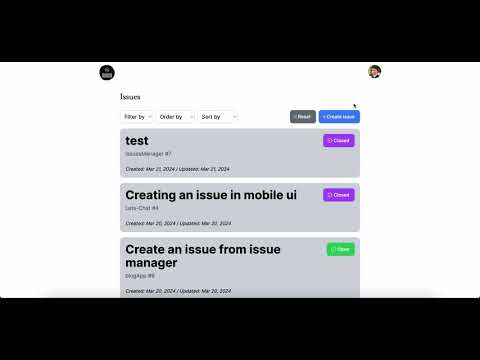
IssuesManager is an application allowing GitHub users to manage issues in one single site.
Treating issues as blogs, users can create, edit, and close on issues. Users can also view all the issues in a list view, and click on each issue to view the details.





This project focuses on the following 3 aspects:
- GitHub OAuth for user authentication I used NextAuth.js to handle the authentication process because it simplifies the authentication process by providing a set of built-in providers, including GitHub. It also handles session management, allowing easy user session management and persist authentication state across pages and requests.
- GitHub API for issue management I used GitHub REST API to manage issues in the user's repositories. What I focused on wat providing the correct authentication token and query parameters to retrieve the desired data, which is extremely important when it comes to issue pagination and filtering.
- Creating the user interface with NextJS and TailwindCSS I chose Next.js because it is a React framework with features like: a. Server-Side Rendering: components are rendered on the server. This improves initial page load performance and facilitate better SEO. b. Code splitting: code is automatically splitted into smaller bundles and loaded only when needed, which improves overall performance. c. App Router: This simplifies the process of defining routes within the application. d. Server Actions: By defining server actions, I can fetch data before rendering the page, which is useful for SEO and performance. In addition, I could use Suspense to handle loading states seamlessly.
I used TailwindCSS because it is a **utility-first CSS** framework that allows me to build custom designs without leaving the HTML. It also provides a set of pre-built components that I can use to build the responsive UI.
You can try out the app in the following URL: https://issues-manager-zeta.vercel.app/
Follow these steps to run the application in your host machine
To run the application in your host machine, make sure npm is set up.
-
npm
Recommend using nvm for Node version management
- Clone the repo
git clone https://github.com/yingtu35/IssuesManager.git
- Install depedencies
npm install
- Create a .env file in the root folder for jwt secret
AUTH_SECRET=yourJwtSecret
- Follow Creating an OAuth App to create an OAuth app. Add the corresponding GitHub ID and secret into the .env file
AUTH_GITHUB_ID=yourGitHubID
AUTH_GITHUB_SECRET=yourGitHubSecret
- Start the application
npm run dev
Enjoy the short 2-min demo to see how IssuesManager works.
- Better page transition
- Reduce page loading time
See the open issues for a full list of proposed features (and known issues).
Contributions are what make the open source community such an amazing place to learn, inspire, and create. Any contributions you make are greatly appreciated.
If you have a suggestion that would make this better, please fork the repo and create a pull request. You can also simply open an issue with the tag "enhancement". Don't forget to give the project a star! Thanks again!
- Fork the Project
- Create your Feature Branch (
git checkout -b feature/AmazingFeature) - Commit your Changes (
git commit -m 'Add some AmazingFeature') - Push to the Branch (
git push origin feature/AmazingFeature) - Open a Pull Request
Distributed under the MIT License. See LICENSE.md for more information.
Ying Tu - yingtu35@gmail.com
Twitter: @YingTu1685990
LinkedIn: Ying Tu
Project Link: IssuesManager