


TestIQ v0.2.2 - Catch duplicate and redundant tests before they pollute your codebase. Perfect for AI-generated test suites.
AI coding assistants (GitHub Copilot, Cursor, ChatGPT) generate tests fast - but they create duplicate and redundant tests that bloat your test suite.
# AI generates these 5 tests - all testing the same thing!
def test_addition():           # AI suggestion 1
    assert calc.add(2, 3) == 5

def test_add_numbers():        # AI suggestion 2
    assert calc.add(2, 3) == 5

def test_sum_calculation():    # AI suggestion 3
    assert calc.add(2, 3) == 5

def test_calculate_sum():      # AI suggestion 4
    assert calc.add(2, 3) == 5

def test_basic_addition():     # AI suggestion 5
assert calc.add(2, 3) == 5$ pytest --testiq-output=coverage.json
$ testiq analyze coverage.json
📊 TestIQ Analysis Results
━━━━━━━━━━━━━━━━━━━━━━━━━━━━━━━━━━━━━━━━━━━━━━
Total tests: 47
✗ Exact duplicates: 39 (83% redundant!)
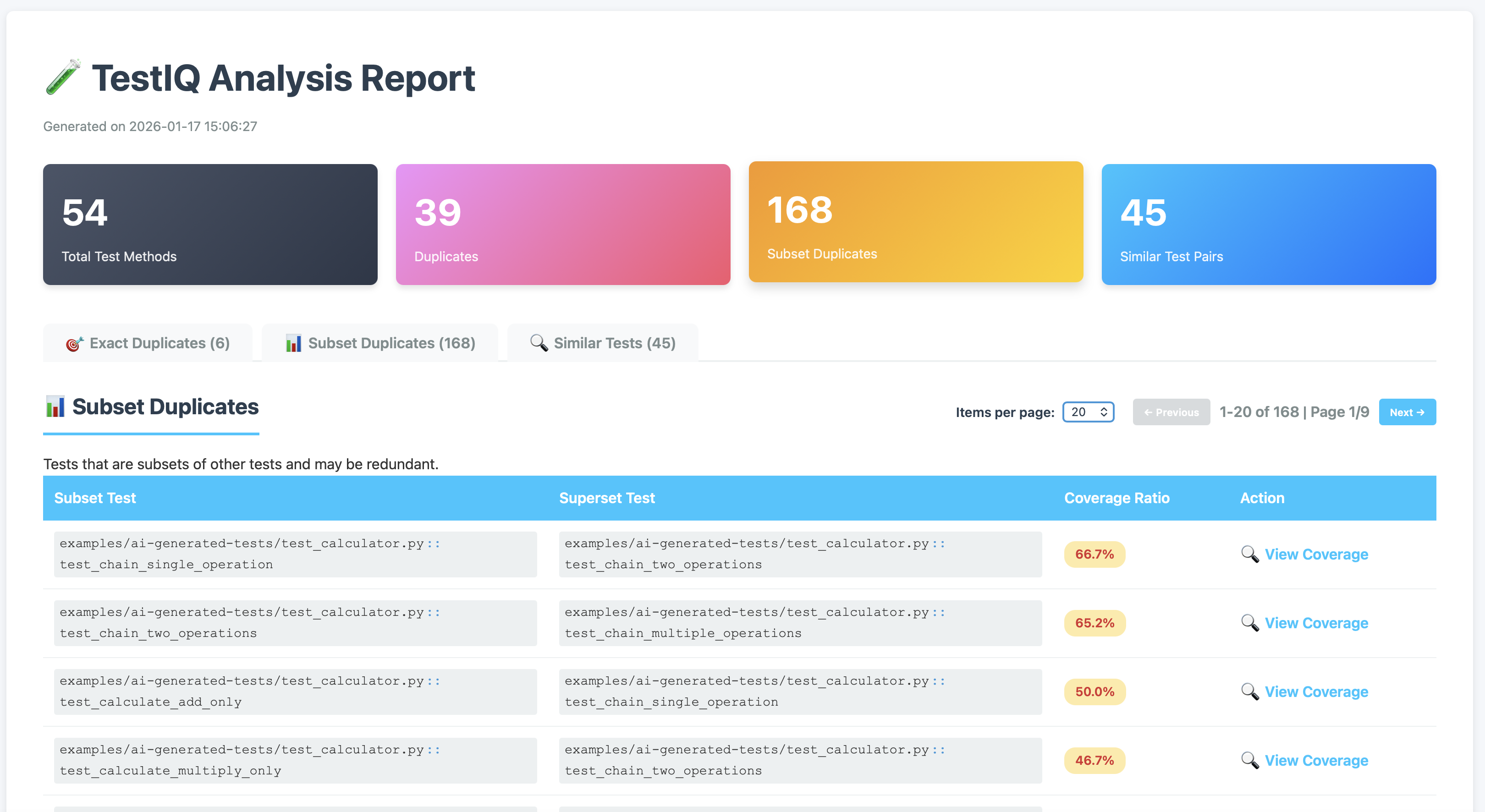
✗ Subset duplicates: 168
✗ Similar pairs: 45
━━━━━━━━━━━━━━━━━━━━━━━━━━━━━━━━━━━━━━━━━━━━━━TestIQ catches AI-generated duplicates automatically - before they waste your CI time! ⚡
- 🎯 Duplicate Detection - Find exact duplicates, subsets, and similar tests
- 🤖 AI Test Quality Gate - Catch AI-generated redundancy in CI
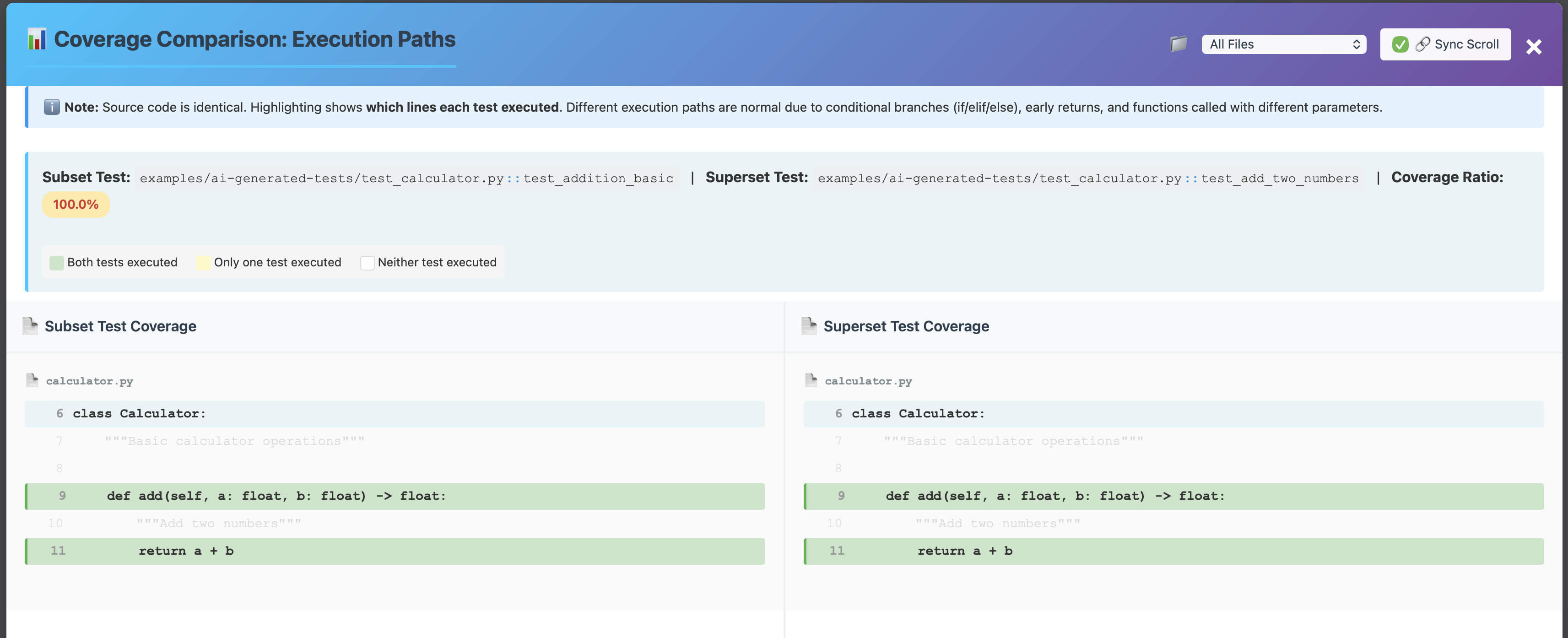
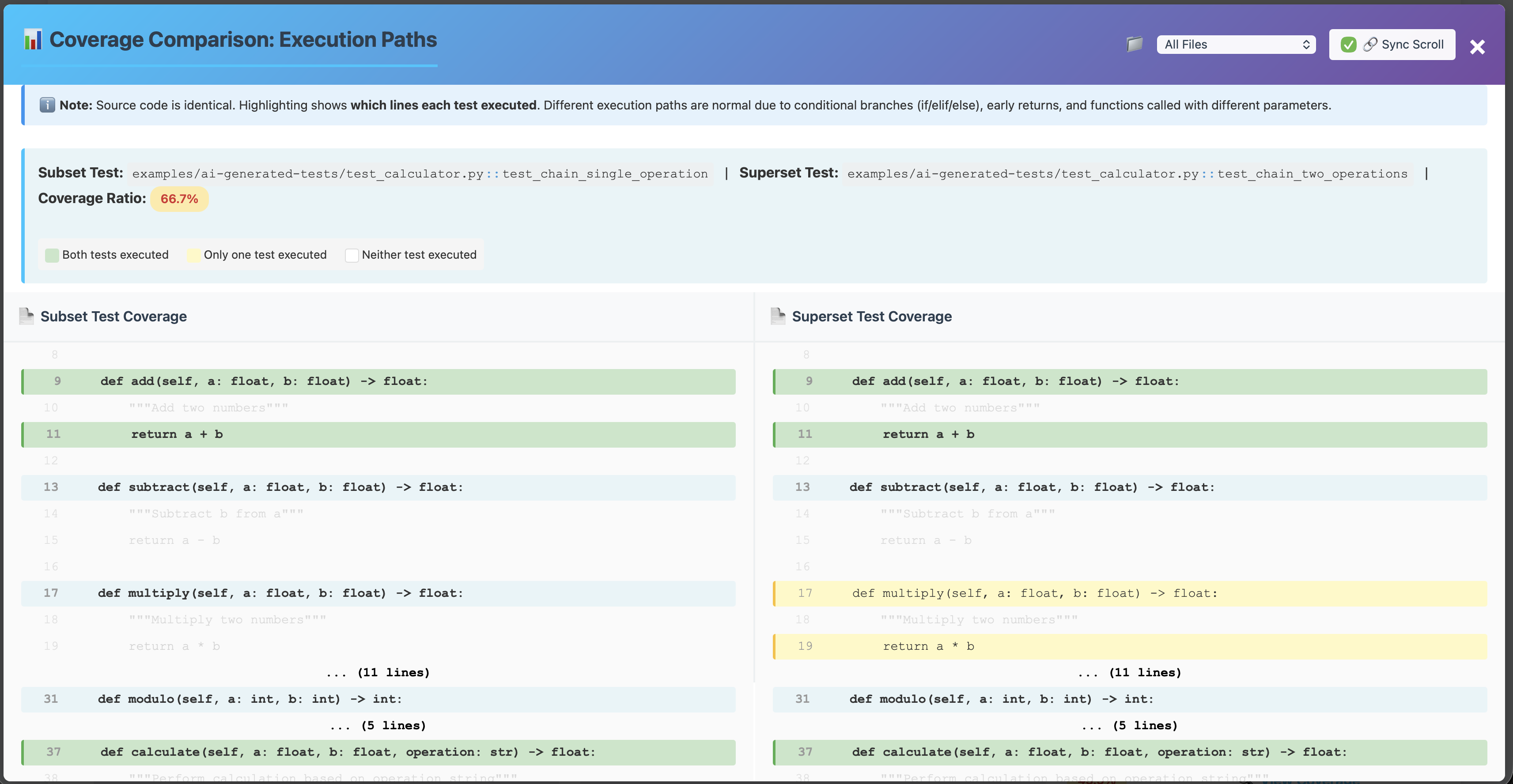
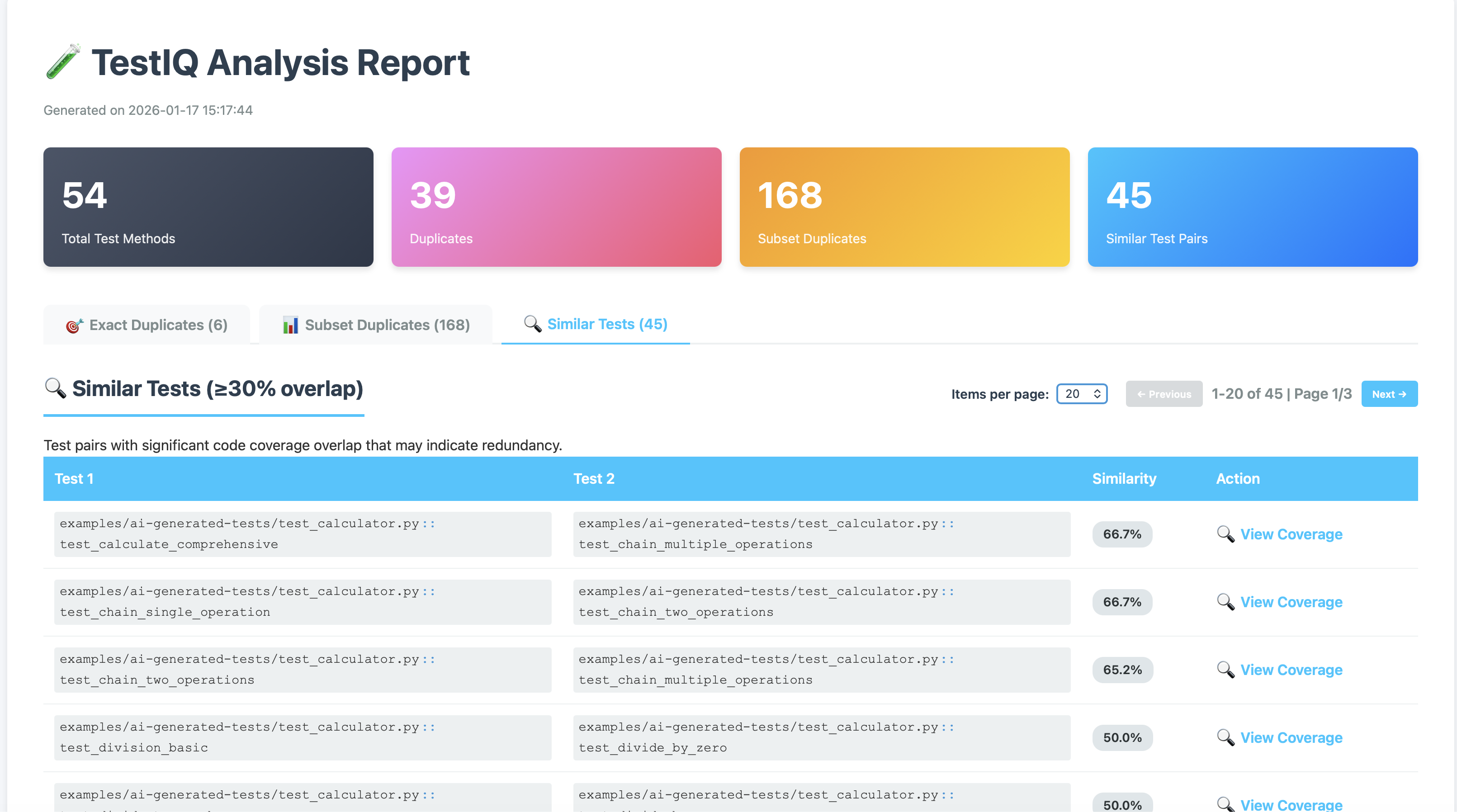
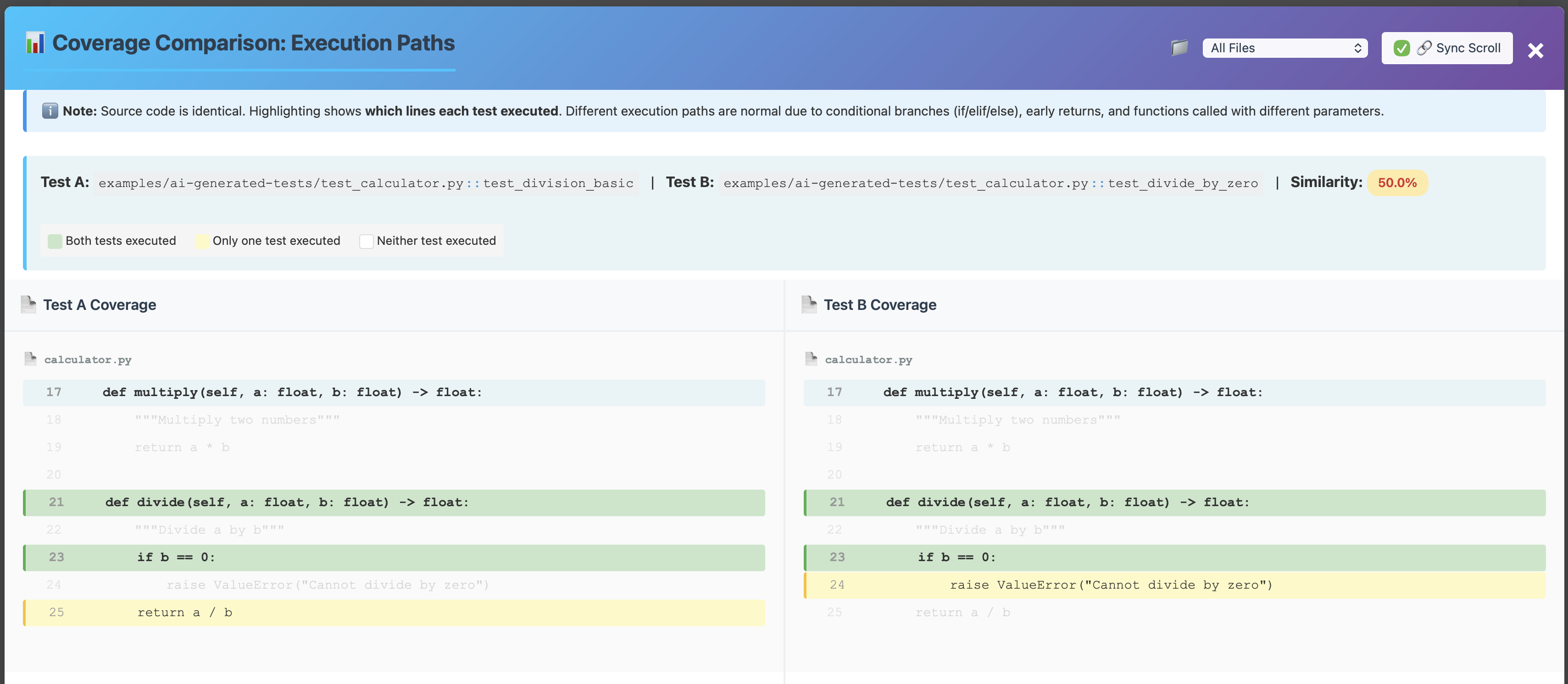
- 📊 Visual Reports - Interactive HTML reports with side-by-side comparison
- 🚦 CI/CD Integration - Quality gates, baselines, and trend tracking
- ⚡ Fast Analysis - Parallel processing for large test suites
- 🧪 pytest Plugin - Built-in plugin for seamless integration
pip install testiqThe pytest plugin automatically collects per-test coverage:
# Run tests with TestIQ coverage collection
pytest --testiq-output=coverage.json

# Analyze the results
testiq analyze coverage.json --format html --output report.html
Pro Tip: Add to your pytest config for automatic collection:
# pytest.ini
[pytest]
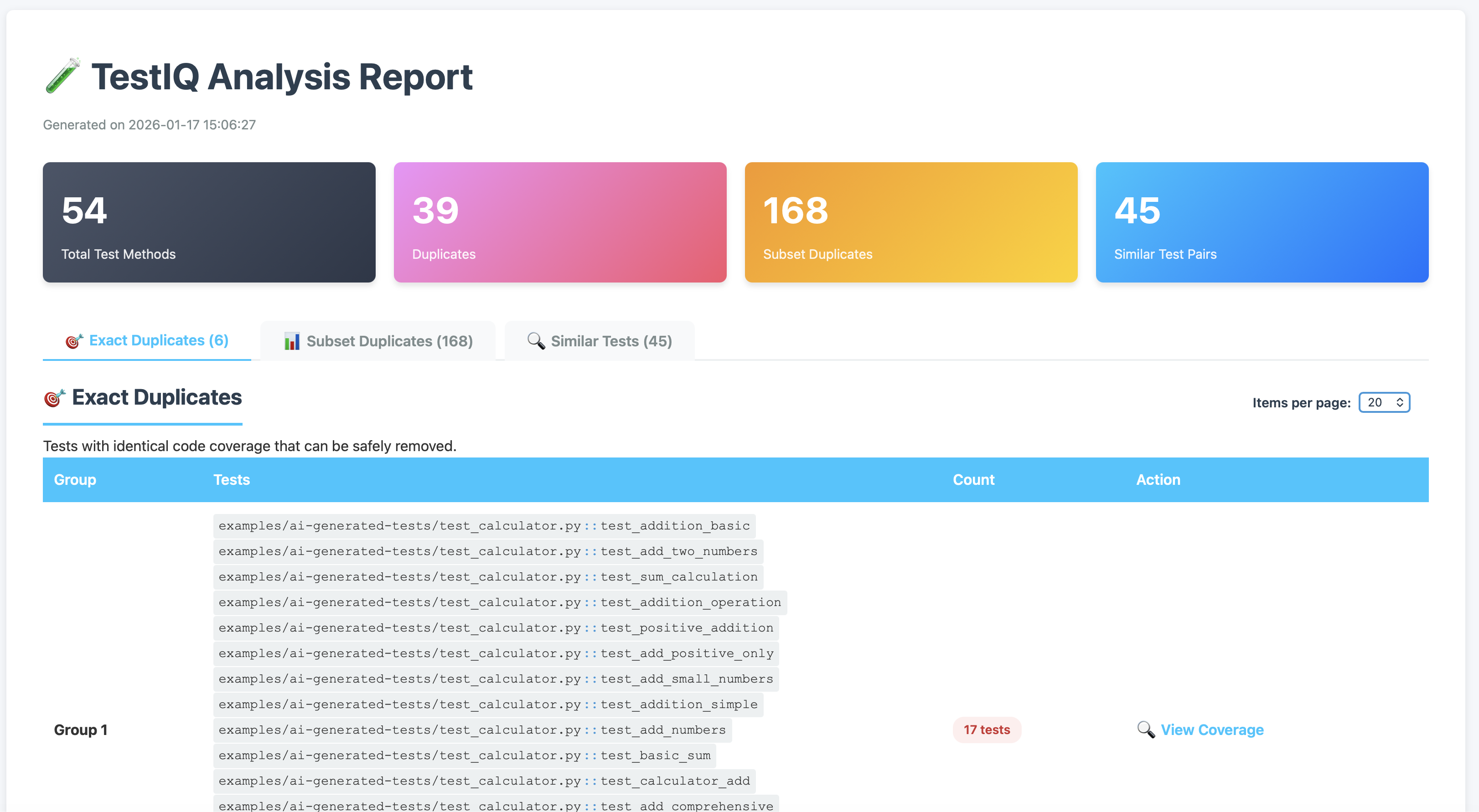
addopts = --testiq-output=coverage.json -vSee real AI-generated test redundancy in action:
cd examples/ai-generated-tests
pytest --testiq-output=coverage.json
testiq analyze coverage.json --format html --output ai-test-report.html
Demo Results:
- 54 tests → 39 exact duplicates (72% redundant!)
- 168 subset relationships
- 45 similar test pairs
- Only 15 tests actually needed ✅
Similarity Threshold (--threshold):
| Value | Meaning | Use Case |
|---|---|---|
| 0.3 (default) | 30% overlap | Development - catch most duplicates |
| 0.5 | 50% overlap | CI/CD - balanced detection |
| 0.7 | 70% overlap | Production - strict quality gate |
| 0.9 | 90% overlap | Very strict - only near-identical tests |
# Strict analysis (only flag tests with 70%+ overlap)
testiq analyze coverage.json --threshold 0.7

# Lenient analysis (flag tests with 20%+ overlap)
testiq analyze coverage.json --threshold 0.2
See Configuration Guide for all options.
See it in action immediately:
# Run demo with sample data
testiq demo
Generate per-test coverage data:
TestIQ needs per-test coverage (which lines each test executes). Use our pytest plugin:
# Run tests with TestIQ plugin (easiest method - recommended)
pytest --testiq-output=testiq_coverage.json

# Or specify your test directory
pytest tests/ --testiq-output=testiq_coverage.json

# Then analyze with TestIQ
testiq analyze testiq_coverage.json --format html --output report.html
Alternative methods:
# Method 2: Use pytest coverage contexts (requires pytest-cov)
pytest --cov=src --cov-context=test --cov-report=json
python -m testiq.coverage_converter coverage.json --with-contexts -o testiq_coverage.json

# Method 3: Convert standard pytest coverage (limited - aggregated only)
pytest --cov=src --cov-report=json
python -m testiq.coverage_converter coverage.json -o testiq_coverage.json
Manual sample data:
# Create sample coverage data (for testing)
cat > testiq_coverage.json << 'EOF'
{
  "test_login_success": {
    "auth.py": [10, 11, 12, 15, 20, 25],
    "user.py": [5, 6, 7, 8]
  },
  "test_login_failure": {
    "auth.py": [10, 11, 12, 15, 16],
    "user.py": [5, 6]
  }
}
EOF

# Analyze the sample data
testiq analyze testiq_coverage.json
📖 See Pytest Integration Guide for complete setup instructions
# Check version
testiq --version

# Use custom config file
testiq --config my-config.yaml analyze testiq_coverage.json

# Set log level
testiq --log-level DEBUG analyze testiq_coverage.json

# Save logs to file
testiq --log-file testiq.log analyze testiq_coverage.json

# Run demo with sample data
testiq demo# Basic analysis with terminal output (text format)
testiq analyze testiq_coverage.json
# With custom similarity threshold (default: 0.3)
testiq analyze testiq_coverage.json --threshold 0.8
# Generate beautiful HTML report
testiq analyze testiq_coverage.json --format html --output reports/report.html
# CSV export for spreadsheet analysis
testiq analyze testiq_coverage.json --format csv --output reports/results.csv
# JSON output for automation
testiq analyze testiq_coverage.json --format json --output reports/results.json
# Markdown format
testiq analyze testiq_coverage.json --format markdown --output reports/results.md
# Get quality score and recommendations
testiq quality-score testiq_coverage.json --output reports/quality.txt# Quality gates (exit code 2 if failed, 1 if duplicates found, 0 if success)
testiq analyze testiq_coverage.json --quality-gate --max-duplicates 5
# Save baseline for future comparisons
testiq analyze testiq_coverage.json --save-baseline my-baseline
# Compare against baseline (fail if quality worsens)
testiq analyze testiq_coverage.json --quality-gate --baseline my-baseline
# Combined: quality gate with threshold and baseline
testiq analyze testiq_coverage.json \
--quality-gate \
--max-duplicates 5 \
--threshold 0.8 \
--baseline production \
--format html \
--output reports/ci-report.html
# Manage baselines
testiq baseline list # List all saved baselines
testiq baseline show my-baseline # Show baseline details
testiq baseline delete old-baseline # Delete a baselineGitHub Actions Example:
name: Test Quality Gate
on: [pull_request]

jobs:
  test-quality:
    runs-on: ubuntu-latest
    steps:
      - uses: actions/checkout@v4
      - uses: actions/setup-python@v5
        with:
          python-version: '3.11'

      - name: Install dependencies
        run: |
          pip install testiq pytest

      - name: Run tests with TestIQ
        run: pytest --testiq-output=coverage.json

      - name: Check for AI-generated duplicates
        run: |
          testiq analyze coverage.json \
            --quality-gate \
            --max-duplicates 0 \
            --format html \
            --output testiq-report.html

      - name: Upload report
        if: always()
        uses: actions/upload-artifact@v4
        with:
          name: testiq-report
path: testiq-report.htmlfrom testiq.analyzer import CoverageDuplicateFinder
import json
# Create analyzer with performance options
finder = CoverageDuplicateFinder(
enable_parallel=True,
max_workers=4,
enable_caching=True
)
# Load coverage data
with open('coverage.json') as f:
coverage_data = json.load(f)
# Add test coverage
for test_name, test_coverage in coverage_data.items():
finder.add_test_coverage(test_name, test_coverage)
# Find issues
exact_duplicates = finder.find_exact_duplicates()
subset_duplicates = finder.find_subset_duplicates()
similar_tests = finder.find_similar_coverage(threshold=0.8)
# Generate reports
from testiq.reporting import HTMLReportGenerator
html_gen = HTMLReportGenerator(finder)
html_gen.generate(Path("reports/report.html"), threshold=0.8)
# Quality analysis
from testiq.analysis import QualityAnalyzer
analyzer = QualityAnalyzer(finder)
score = analyzer.calculate_score(threshold=0.8)
print(f"Quality Score: {score.overall_score}/100 (Grade: {score.grade})")See complete working examples:
- 📁 Python API Examples - Complete demonstration of all features
- 📁 Bash Examples - Quick CLI testing scripts
- 📁 CI/CD Examples - Jenkins & GitHub Actions integration
- 📖 Manual Testing Guide - Comprehensive testing guide
CI/CD Integration:
- Jenkinsfile Example - Complete Jenkins pipeline with quality gates
- GitHub Actions Example - Full workflow with error handling
- Try the demo:
testiq demo - Analyze your tests:
testiq analyze coverage.json - Run examples:
python examples/python/manual_test.py - Integrate with CI/CD: See examples/cicd/
TestIQ calculates a comprehensive quality score (0-100) with letter grade (A+ to F):
- Duplication Score (40%) - Based on exact duplicates found
- Coverage Efficiency (30%) - Tests with broad vs. narrow coverage
- Uniqueness Score (30%) - Based on similar/subset tests
Important Notes:
- Coverage Efficiency requires source metadata - Use
pytest --covwith--cov-report=jsonto generate.coveragefile with source line info - Without source metadata, efficiency score is 0 - This lowers overall grade but doesn't indicate actual problems
- Run
make test-completeor sequential coverage+TestIQ analysis for full scoring
TestIQ uses coverage-based duplicate detection - it identifies tests that execute the same code paths. This can include:
True Duplicates (Should Review):
- ✅ Multiple tests with identical coverage and same purpose
- ✅ Copy-pasted tests with minor naming differences
- ✅ Tests that add no unique code coverage value
False Positives (Expected Behavior):
⚠️ Tests with same coverage but different assertions/logic⚠️ Tests that exercise different input values (same code path)⚠️ Tests focused on behavior verification vs. code coverage
Example: Two tests that both create a dataclass instance will show identical coverage (import paths), but one might test validation while another tests defaults - both are valuable!
Recommendations:
- Review high-priority duplicates first - These have highest impact
- Check test intent, not just coverage - Different assertions mean different value
- Focus on exact duplicates - Subset/similar tests may be intentional
- Use quality score as a guide - Not an absolute metric
- Combine with test execution time - Slow duplicate tests are higher priority
For best results, run coverage and duplicate detection separately:
# Option 1: Use make target (recommended)
make test-complete

# Option 2: Run manually
pytest --cov=testiq --cov-report=term --cov-report=html  # Coverage first
pytest --testiq-output=testiq_coverage.json -q            # TestIQ second
testiq analyze testiq_coverage.json --format html --output reports/duplicates.html

# Option 3: Use provided script
./run_complete_analysis.sh
Why separate runs? Python's sys.settrace() allows only ONE active tracer. Running both together causes conflicts (19% coverage vs 81% separate).
- 📉 72% test reduction in AI-generated test suites
- ⚡ Faster CI/CD - Remove slow duplicate tests
- 💰 Lower costs - Less CI compute time
- 🎯 Better quality - Focus on unique, valuable tests
- 🤖 AI-proof - Catch redundant tests before merge
- ✅ GitHub Copilot
- ✅ Cursor AI
- ✅ ChatGPT for testing
- ✅ Any AI code assistant
- ✅ TDD workflows
- ✅ Large test suites
- Try the demo:
cd examples/ai-generated-tests && pytest --testiq-output=coverage.json - Add to your CI: See GitHub Actions example above
- Share your results: Open an issue to share your test reduction story!
- Star the repo: Help others discover TestIQ ⭐
| Document | Description |
|---|---|
| Interpreting Results | Understanding TestIQ scores and recommendations |
| Pytest Integration | Generate per-test coverage data |
| Configuration | Config file options (.testiq.toml/.testiq.yaml) |
| CLI Reference | Command-line interface docs |
| API Reference | Python API documentation |
| CHANGELOG | v0.2.0 release notes |
- Contributing Guide - How to contribute
- Security Policy - Vulnerability reporting
- Examples - Python, CI/CD, and sample data
We welcome contributions! TestIQ is built by developers for developers. See CONTRIBUTING.md for guidelines.
MIT License - see LICENSE for details.
For security vulnerabilities, see SECURITY.md for responsible disclosure.
Made with ❤️ for developers drowning in AI-generated tests