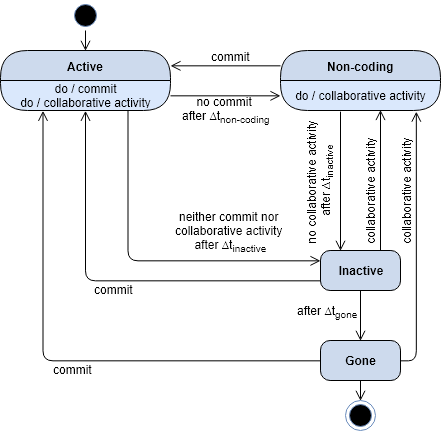
Use the productivity branch for the latest updates.
Add to the root a folder named Resources/ with the following files:
repositories.txtcontaining the list of projects (one per line) to be analyzed, in the following formatorg/repo_name(e.g., `atom/atom);tokens.txt(optional) containing the list of GH tokens to be used;
Refer to this README.md file.
Refer to this README.md file.
Uses the tokens defined in Resources/tokens.txt and the list of repository urls in Resources/repositories.txt, as defined in the Settings.py file.
- None.
- Set files and folders names in the
Settings.pyfile
python CommitExtractor.py
logs/Commit_Extraction_organization.log: log fileOrganizations/<organization>/[<repo1>...<repoN>]/: Results folders- For each repo folder:
commit_list.csv: List of the commits in the format: <SHA; author_id; date>commit_history_table.csv: Matrix of autors and dates. The cells contain the number of the commits of a developer in one daypauses_duration_list.csv: List of pauses durations in days for each developer in the format: <dev; listOfDurations>pauses_dates_list.csv: List of pauses dates for each developer in the format: <dev; listOfPauseDates>
- The same files are given after merging the commits of every organization's repo in the
Organizations/<organization>/folder.
if you came here from point 2 of core selection you can now perform step 3 following (CoreSelection | Step 3)
- None
- Set files and folders names in the
Settings.pyfile
python ActivitiesExtractor.py
logs/Commit_Extraction_organization.log: log fileOrganizations/<organization>/[<repo1>...<repoN>]/Other_Activities/: Results folders- For each repo folder:
issues_comments_repo.csv: List of the issue comments in the format: <id; date; creator_login>issues_events_repo.csv: List of the issue events in the format: <id; date; creator_login>issues_prs_repo.csv: List of the issue and pull request creations in the format: <id; date; creator_login>pulls_comments_repo.csv: List of the pull request comments in the format: <id; date; creator_login>
mode: enter one of following modes ['tf', 'a80', 'a80mod', 'a80api']
- Set files and folders names in the
Settings.pyfile - Insert the list of the TF/core developers (<TF_developers_file>) in the right folder. Formatted as a list of <name;login>. The path to save the file is set in the
Settings.pyfile. - Set the
windowsize and theshiftsize in theSettings.pyfile
python BreaksIdentification.py tf | a80 | a80mod | a80api
logs/Breaks_Identification.log: log fileOrganizations/<organization>/Dev_Breaks/: Results folders- For each developer in the TF file:
<devLogin>_breaks.csv: List of the breaks in the format: <len; dates; Tfov_used>
Let D be a developer to analyze and let life(D) be the number of days between its first and last commits.
For each sliding window W in life(D) which slides of shift days. The values of variables window (default 90 days) and shift (default 7 days) are set in the Settings.py file).
The goal is to select all the breaks (pauses that are larger than usual) associated with the Tfov (Far-out-value threshold) of the first window where they have been found:
- PAUSES SELECTION STEP
- In the list
win_pauses, put all the pauses within W (only these pauses define the rythm of D in W). - In the list
partially_included, put all the pauses partially within W (i.e., pauses that start in W and end in the next window).
- Tfov DEFINITION STEP
-
If
win_pausescontains >=4 pauses then the W is valid, then usewin_pausesto calculate Tfov. If Tfov is valid (i.e., IQR>1), then proceed to the breaks identification step (go to STEP 3). -
Else, when
win_pauses< 4 (i.e., Tfov cannot be calculated) or if Tfov is invalid (i.e., IQR<=1) for W, then:- If a previous Tfov exists, then consider it as the current Tfov and proceed to the next step for breaks identification (go to STEP 3).
- Otherwise, save into the list
clear_breaksall the pauses frompartially_includedthat are larger than the window size and have not been considered yet, ignore the other pauses inwin_pauses; move forward W by shift days and RESTART (go back to STEP 1).
(Note: The pauses that are larger than shift days will be considered in the next W and so on, whereas the smaller ones are not breaks and can be safely ignored).
- BREAKS IDENTIFICATION STEP
- Select as break each couple <p, t> from the lists
win_pausesandpartially_includedwhere t is Tfov and p is a pause > Tfov.- Move forward W by shift days and RESTART (go back to STEP 1).
- FINAL STEP (When there are no more W)
- Compute Avg_Tfov as the average of all the valid Tfovs found.
- Save the pauses in the list
clear_breaksas breaks (<p, t> where t is Avg_Tfov, and p is a pause > Avg_Tfov as for list definition).
mode: choose one of following modes ['tf', 'a80', 'a80mod', 'a80api']
- Make sure to have already executed the
BreaksIdentification.pyscript to get the<devLogin>_breaks.csvfiles (one for each developer).
python BreaksLabeling.py tf | a80 | a80mod | a80api
logs/Breaks_Labeling.log: events log fileOrganizations/<organization>/Dev_Breaks/: Results folders- For each developer in the TF file:
<devLogin>_labeled_breaks.csv: List of the breaks in the format: <len; dates; Tfov_used; label; previously>
-
Get a break from the
Breakslist. -
If there is not any other activity performed by the developer during the break, then label it
INACTIVEif < 365 days;GONEotherwise. -
If there are other activities in the period:
- Define
sub_breaks_listas the list of the intervals between such activities (sub_break). - Identify each sub_break > Tfov from the
sub_breaks_listand label it based on the defined state diagram (∆t_inactive = ∆t_non-coding = Tfov).